

IT asset discovery finds every device you're responsible for, including the ones nobody wrote down. A small team combines the lists its tools already keep (RMM agents, device consoles, DHCP and switch tables) with one active agentless scan per network. Then it reconciles the results with its asset list.
We build SherpaDesk, a helpdesk and PSA (professional services automation) a small IT team can run alone. No contract. No implementation project. No dedicated admin.
What Is IT Asset Discovery?
Definition
IT asset discovery is the work of finding every device connected to, or owned by, the networks you support, and recording what each one is. TechTarget describes network scanning as a way to "survey the network to create an inventory of all connected devices."
Discovery feeds the inventory: IT asset management "typically involves performing asset discovery and gathering a detailed inventory." The inventory is the record you keep; discovery checks it against the network. Our IT asset inventory guide covers the record.
Security teams use the same words for attack-surface discovery: finding the points "where an attacker can try to enter." This guide covers the devices you support.
Agent Vs Agentless: Where Discovered Devices Come From
An agent is software on the device that reports in. An active agentless scan asks the network: it signals devices and waits for "a response." Passive discovery sends no probes; CIS lists it as a separate safeguard. Console and API exports report what another system already manages. NIST warns that some components "cannot support agents (e.g., IoT devices, sensors)."
| Source | Finds | Misses |
|---|---|---|
| RMM agent | Managed computers and servers, with hardware details | IoT devices and sensors, plus printers, switches, and cameras without the agent |
| MDM or device console | Enrolled phones, tablets, and Chromebooks | Devices outside that management; Google's mobile list shows devices used "to sign in to their managed accounts" |
| Directory (AD or Entra ID) | Device objects registered or joined to the directory | Devices outside the directory; incomplete inventory data |
| Active agentless scan | Anything that answers on the subnet, including printers and switches | Devices that are off or away |
| DHCP leases and switch tables | Devices that took an address or a switch port, by MAC | Make, model, and owner |
| A walk-through | Offline spares, unmanaged switches, shelves | Remote laptops |
As one r/sysadmin member put it, "I like discovering devices and having a manual inventory. In my opinion, they have different goals."
What You Need Before You Start
How To Run IT Asset Discovery, Step By Step
Example throughout: Lakeside Vet, an MSP client with two offices, an RMM, and a 60-row asset list.
-
Pull the lists your tools already keep
Export the RMM device list, the MDM or Google console, the directory, and each firewall's DHCP leases. CIS asks teams to use DHCP logs to update the inventory "weekly, or more frequently."
Example: the RMM shows 41 computers; the firewalls hold 72 DHCP leases.
Common mistake: exporting names only. As one r/sysadmin member advised, "Try to get useful keys out like serial numbers and mac addresses, you'll want these later."
-
Scan each network from inside it
Whatever asset discovery tools you use, agree the address range with the client. Check that the scan machine reaches each VLAN, run an active agentless scan, and save the result with source and timestamp. CIS recommends active discovery "daily, or more frequently."
Example: scans at both offices return 18 devices, including two printers, a NAS, and a camera recorder no agent reports.
Common mistake: assuming the scan sees every switch. One r/sysadmin member warns: "Watch out for hubs or unmanaged switches- they’re tough to find without tracing cables."
-
Group the sightings and confirm each match
Put every export into one sheet, one row per sighting, with source and timestamp. Within one client, rows sharing a serial or MAC become match candidates. Merge only after confirming both sightings belong to one physical device; doubtful pairs stay separate. NIST asks for no "duplicate accounting of components." The inventory guide has the detailed rules.
Example: 131 sightings (41 RMM, 72 DHCP, 18 scan) become 78 confirmed devices.
Common mistake: keying on IP addresses. They can change when a lease expires.
-
Reconcile the list with your asset record
Sort every device into three buckets: matched, on the record but not seen, or seen but not on the record.
Example: 56 devices match, four records were not seen, and 22 devices are unknown.
Common mistake: marking "not seen" devices as missing. A laptop that was off still exists.
-
Work every unknown device to a decision
Identify it, name an owner, and decide. CIS asks for a weekly process for unauthorized assets: remove the asset, deny it remote access, or "quarantine the asset." A legitimate device gets a record.
Example: 15 of the 22 are approved staff phones on guest Wi-Fi, moved to a personal list. The printers, NAS, recorder, and a switch get records. Two unidentified devices stay open on tickets, owned by the lead technician, due in seven days.
Common mistake: leaving unknowns in a spreadsheet tab. A ticket gives each one an owner and a date.
-
Walk what no scan can see
Visit each site with the list. As one r/sysadmin member put it, "Automated asset discovery is great and all but nothing beats an onsite visit." Our IT asset audit checklist runs the count.
Example: the walk finds the four unseen records: three spare laptops in a cupboard and a retired PC.
Common mistake: treating the walk and the scan as either-or. Another member walks first, so "when you do automatic discovery you have a clue if it's accurate."
Subscribe to the SherpaDesk Blog.
Get Tips for Running IT With a Small Team.
Loading form…
The form couldn’t load. Please try again.
Or start your free trial →SHERPADESK · FREE TRIAL
Resolve tickets.
Turn time into revenue.
Bring support tickets, billable time, and invoicing into one place. Built for small IT teams and MSPs.
- 14 days free
- No credit card required
After your trial, keep your first agent free forever.
SHERPADESK · LIVE DEMO
See tickets, time,
and billing work together.
Walk through ticketing, time tracking, and billing with a product specialist. See how SherpaDesk fits the way your team works.
- 15 minutes
- Your workflow, your questions
A live walkthrough tailored to your team.
An Asset Discovery Schedule For A Small Team
CIS sets the pace: active scans daily, DHCP logs and unauthorized assets weekly, and an inventory review "bi-annually, or more frequently." RMM and console syncs run on each source's own settings.
- Scan
The active agentless scan runs on a schedule.
- Review new devices
Check new scan results and DHCP leases, open a ticket per unknown, and close last week's.
- Reconcile
Match every export to the asset record and chase "not seen" records with their users.
- Walk each site
Rotate visits so every site gets two.
What To Look For In IT Asset Discovery Tools
Most IT asset discovery tools find devices; the difference is what happens next. Ask these questions before you buy an IT asset discovery tool. For full tracking, see our IT asset management software picks.
| Question | Why it matters |
|---|---|
| Can it scan from inside each site? | A scan only sees what it can reach. |
| Does it combine agent, agentless, and console data? | Each source misses something. |
| Does it flag likely duplicates by serial or MAC? | IP-based lists double-count; you confirm each merge. |
| Does it flag new devices since the last run? | Unknowns need a decision within a week. |
| Can it export or sync to your asset list? | Otherwise the data stays in one more console. |
| What credentials does it need? | A scan that logs in needs an account on each device. |
Security-focused asset discovery tools add vulnerability data. For an inventory, a small team can skip that layer.
How To Measure It Worked
Track three numbers monthly:
- Unknown devices open at month end.
- Match rate. Supported devices matched to a record, divided by supported devices discovered. Count approved personal devices and still-unknown devices separately.
- Days to close an unknown. From the ticket opening to its decision. CIS asks for a weekly process, so aim for seven days or fewer.
How this works in SherpaDesk
Your discovered devices in the helpdesk
It's a helpdesk and PSA a small IT team can run alone. No contract, 14 days free, no card. If you run NinjaOne, you can sync its devices into Asset Manager, each device role mapped to a category and type. You can also set alert rules that turn NinjaOne alerts into tickets. Schools can sync Chromebooks, Android, and iOS devices from Google Device Manager, with serial number, MAC address, and device ID mapped to asset fields.
Bulk-import assets from the XLSX template, or add them by hand. Each asset has a unique ID and a status, such as active, retired, or missing. An asset auditor assigned to a location verifies its assets or marks them missing. Assets link to tickets.
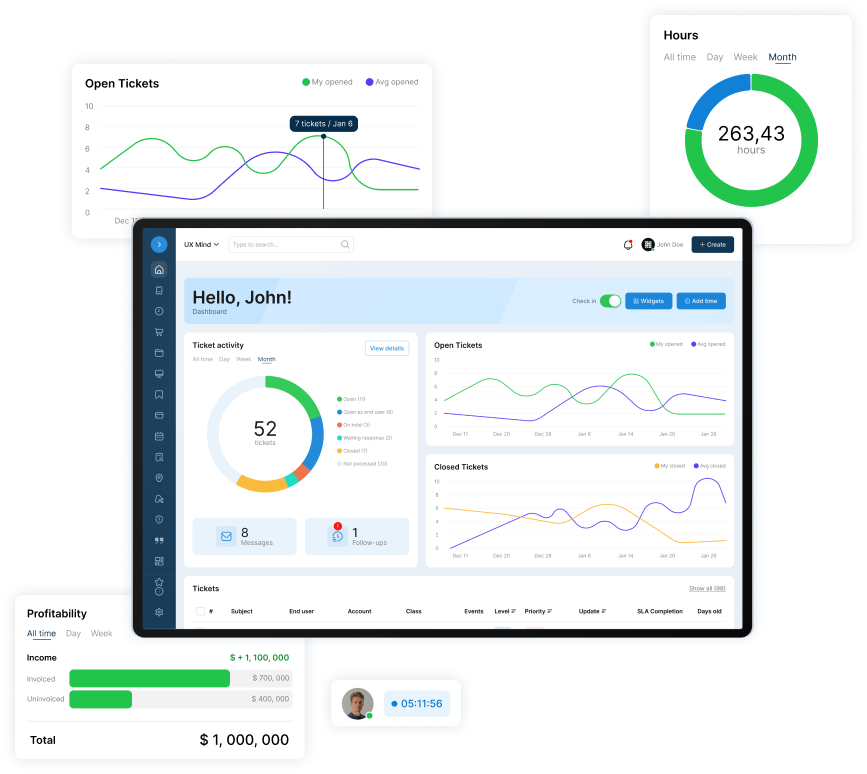
Base Camp is $45 per agent per month ($40 billed annually); Asset Manager is on High Camp, $55 per agent per month ($50 billed annually). Schools are priced by student enrollment; ask sales for a quote.
Who this isn't for
Security teams doing attack-surface discovery. You bring devices into Asset Manager by NinjaOne or Google Device Manager sync, XLSX import, or by hand, and run network scans in your own tools. We don't build RMM. We integrate with yours, and the stack stays yours.
Frequently Asked Questions
What is the difference between asset discovery and asset inventory?
Discovery finds what is on your networks and in your consoles. The inventory is the record you keep, one entry per device with its owner and status. Discovery checks the record.
Agent or agentless discovery: which does a small team need?
Both. Agents report details from computers you manage, but some components "cannot support agents." Active agentless scans cover printers, switches, and cameras. With an RMM in place, add one scheduled scan per subnet.
How often should you run IT asset discovery?
Run active scans daily and review DHCP leases and unknown devices weekly, as CIS recommends. Syncs follow each source's settings. Reconcile monthly and walk each site twice a year.
Does an RMM do asset discovery?
Its agent reports the devices it is installed on. Check whether yours also lists devices without an agent. Our RMM tools comparison is a starting point.
What should you do when discovery finds an unknown device?
Open a ticket, identify the device from its MAC address and switch port, and name an owner. Then add a record, move it to a personal list, or remove or quarantine it, two options CIS Safeguard 1.2 names. Close it within a week.

Patrick co-founded SherpaDesk and has led it as CEO since 2013. He has worked with IT service providers since 1998, first on network projects for schools and government offices, then on the helpdesk software their technicians use every day.